Quick Chat is a method of talking using pre-set messages. It was released on 21 May 2008. Jagex has stated on 9 February 2009 that Quick Chat was introduced to comply with legal responsibilities, and was not because they wanted players to stop using free chat[1]. If a player uses a birthdate that is under the age of 13, that player is only allowed to use Quick Chat.
Quick Chat works by selecting from a database of messages. It also works using items, similar to the Grand Exchange item database - the user simply types an item name and it finds it from its list of items. This is the same with locations, food and monsters, as it has a database for each respectively.
Players can access Quick Chat in several ways:
- Clicking the Speech icon (
 ) in the Chat Box
 - Pressing the Enter Key with no text previously typed.
- Pressing the Enter Key twice consecutively if text has been previously typed.
- Pressing the Enter Key with the '/' typed to bring up Friend Quick Chat.
- Right-clicking on your name and selecting either Public or Clan Quick Chat.
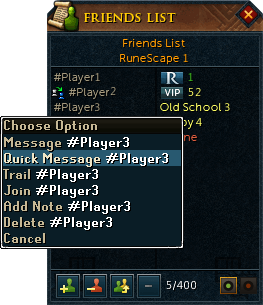
- Right-clicking on a name in your Friends list and selecting Quick Message for private Quick Chat.

Quick Chat is fast because it can be activated using keyboard shortcuts.
The current Quick Chat official world is World 96, as this is the only world where you can't chat freely. Many players use this world to get lots of raw items without competition.
Context-sensitive chat
This only works in certain places. Depending on where you are, there are pre-set messages just for you. Hit F10 to view these. The places in which context-sensitive chat works are:
- Barbarian Assault
- Blast Furnace
- Castle Wars
- Clan Wars
- Duel Arena
- Falador Mole Lair
- Fishing Trawler
- Fist of Guthix
- Games Room
- Gnome Ball
- God Wars Dungeon
- Great Orb Project
- Kalphite Lair
- Party Room
- Pest Control
- Player-owned houses
- Shades of Mort'ton
- Stealing Creation
- Trouble Brewing
- TzHaar Fight Pit
- Waterbirth Island Dungeon
Using the context-sensitive chat feature outside these areas will instead bring up the menu for the skill you last trained. Melee combat however used to always to bring up Attack, although this has now been fixed.
For example, if you last cut down a tree, pressing F10 will bring up the Woodcutting Quick Chat menu.
Keyboard shortcuts
In addition to the Quick Chat update, the update also changed some of the previous keyboard shortcuts and introduced a new shortcut allowing the user to repeat the last Quick Chat message, along with other shortcuts.
- Enter - opens up Quick Chat if you aren't currently typing anything.
- Enter (again) - opens the generic "search", where typing any word will search all possible combinations of the use of that word.
- Page Up - scroll up the menu
- Page Down - scroll down the menu, or select the first item in search results
- Backspace - Move back to the previous menu level
- Home - return to the top level of the menu
- Esc - close the Quick Chat
The following shortcuts only work if the chatbox is active (Click on the space beside the username).
- F9 - opens the quick responses feature. From here, if someone said "How can I train up my Ranged level?", you could quickly reply with a monster name - e.g. "Try ranging: Chickens".
- F10 - opens up the context-sensitive Quick Chat menu.
- F12 - repeats the last phrase you said using Quick Chat.
Full list of keyboard shortcuts
Problems with Quick Chat
Given that Quick Chat is available to both muted and non-muted players, as opposed to normal chat (only accessible to non-muted players), some have expressed concern that it will become a tool for spamming. It remains to be seen whether this is the case. Quick Chat is reportable and there are no rules for it, because players with a permanent mute are limited to Quick Chat.
The other concern is as to whether it will be a useful feature for most players. The main problem with the system is the sheer number of combinations, which makes it more difficult for players to learn specifics.
Unobtainable items
Over its history, Quick Chat has referred to a number of unknown items. These items were found by searching the "I like your item...","I got item:..." and "I got an item:..." option. The items are all actual items in the game engine, but have not been released for one reason or another. Some of the Skill guide icons are actual items which appeared on the list. A majority have been removed, however some are still present.
Current
- Arianwyn
- Blood tithe pouch
- Bulging taxbag
- Bolrie
- Commander veldaban
- Dwarf
- Exploding vial
- Golrana
- Golrie
- Guam-in-a-box?
- Hartwin
- Hoop
- No eggs
- Mcm expo xp boost dummy
- Paddle
- Paintbrush
- Opn notebook inv
- Raf xp boost dummy
- Roddeck's pipe
- Throwing Rope
- Truffle
- Veldaban
- Junk
- November 2012 gamecard unlock
- November 2012 gamecard unlock hair only
- Seaweed-in-a-box
- Jal'yt-ga'al-kot
- The Drop token
- Modhead raven
- Intel bundle refund
Unobtainable as actual items
These items are only obtainable virtually; i.e. you cannot physically own the item in your inventory. These include spins from watching an advertisement (which is automatically redeemed) and a number of cosmetic overrides:
Microtransaction items:
- Squeal spin
- Squeal sponsored spin
- Treasure hunter key (sponsored)
- Batch 16 premium hair f (1-3)
- Batch 16 premium hair m 1
- Batch 16 premium beard (1-2)
- Mtx Pet
- Premium hair m (1-11)
- Premium hair f (1-13)
- Preset slot (6-10) (rental)
- Preset slot (6-10) (permanent unlock)
- Do not translate
- Do not translate-never seen
The Bird and the Beast buildings:
- Booby trap (armadyl/bandos)
- Carpenter's station (armadyl/bandos)
- Divining lodestone (armadyl/bandos)
- Divining siphon (armadyl/bandos)
- Faction banner (bandos)
- Faction banner (armadyl) 3
- Spider hole (armadyl/bandos)
- Teleport focus (armadyl/bandos)
- Watchtower (armadyl/bandos)
Other:
- Sacrifice - doesn't appear as an actual drop; auto unlocked when it happens
- Devotion - same as above
- Transfigure - same as above
- Ring of kinship reset - Dungeoneering unlock reward
- Dungeoneering experience - same as above
- Wild card - same as above
- Any other nihil part - used in the make-x interface for transfiguring parts
- Nihil pouch - same as above
- Nightstick - Court case item that exists only as a chathead
- To Page (1-6) - Options from the Costume room
- Skin colour choice - a doppelganger item from the Green skin promo period
- Apricot cream pie - an item used in The Fremennik Isles jestering section
- Ltep maggoty dough inv - Unknown use. Most likely used in Let Them Eat Pie.
- Mtxbeach 2016 hookaduck rod - The rod used for the "Hook a duck" event in Summer Beach Party
Removed
- Jmod boss
- Pretty girl
- Sine wave
- Cape fire
- Sphinx baby
- Firestarter
- Brass monkey
- 9mm revolver
- Double helix
- Mobile phone
- Spade of coke
- Perfect
- Meat stick
- Trh51 fish hoover left hand particles
- Back...
- Garish-pink partyhat
- More...
- null
- Off-white partyhat
- Placeholdergfx inventory sword
- Really rotten potato
- Thingy
Fixed
- German Dungeoneering items
Trivia
- The Quick Chat icon can change colour over a period of time.
- It's possible to say "Another one bites the dust", which is a song by Queen.
- The Flash Powder Factory phrases don't come up on the Context Sensitive menu during the minigame; instead "Herblore" is displayed.
References
- ^ Mod MMG, The Future of RuneScape, RuneScape News.


| Dummy items | |
| Scrapped |
 Truffle Truffle |
| Jokes |
 Thingy Thingy |


