
The Logout button is used to log out of RuneScape, and is located to the top-right of the minimap, unless "Hide title bars when locked" is enabled in Interface settings. It is also shown regardless of this option if "Legacy Interface Mode" is enabled in Gameplay settings.
Upon clicking the logout button, a confirmation interface is displayed, with two options:
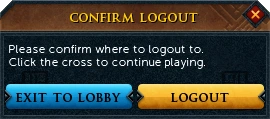
The "Confirm logout" interface
- "Exit to Lobby" - Logs the player out to the Lobby
- "Logout" - Logs the player out completely, back to the Login screen
These options are also found at the bottom-right of the Options menu.
Players can log out at any time, although they must be out of combat for at least 10 seconds.
If a player does nothing (i.e. no clicking, typing or cursor movement) for 5 minutes, the player is automatically logged out to the Lobby. This can also be prevented by simply moving the mouse cursor, without needing to click on anything.
The player will also be logged out completely if they have been playing for 23 hours straight, regardless of activity. To log back in again they will need to either restart the game client or refresh the game page.
Trivia
- In RuneScape Classic, the game automatically logged you off if you stayed in one spot for over 5 minutes, regardless of whether or not you were doing anything.
- The old logout button was a door.

- In the 'Behind the Scenes - January' news post, Jagex mentioned that the auto-logout time would be changed to 5 minutes instead of 90 seconds. The logout timer was changed from 90 seconds to 5 minutes on 13 January 2009.
- Before the ninja update on 16 March 2015 the forced logout time was only 6 hours instead of 23.
- In Fist of Guthix, if the player tries to log out, they receive the message: "You can't log out in the middle of a game. If you want to leave, use one of the exits." Forcing a logout by closing the game causes the player to forfeit the game, and lose 24 rating points.


